
OpenAI ChatGPT Desktop Codex Tab Gains Productive Voice Coding Mode
OpenAI's ChatGPT desktop app now features a Codex tab with a voice conversation mode. This addition enables developers to interact with their code, configure imports, and modify features in a local development environment using voice as the primary interface.
What changed?
The ChatGPT desktop application now offers a Codex tab with robust voice conversation mode, allowing developers to interact with and modify their codebase using voice commands. This mode can launch local development servers, preview live updates, generate migrations, write views and templates, and run import scripts, all guided by spoken instructions. The system (demonstrated with GPT-6 Astra High) supports conversational workflows, clarifications, and iterates on features based on rapid vocal feedback.
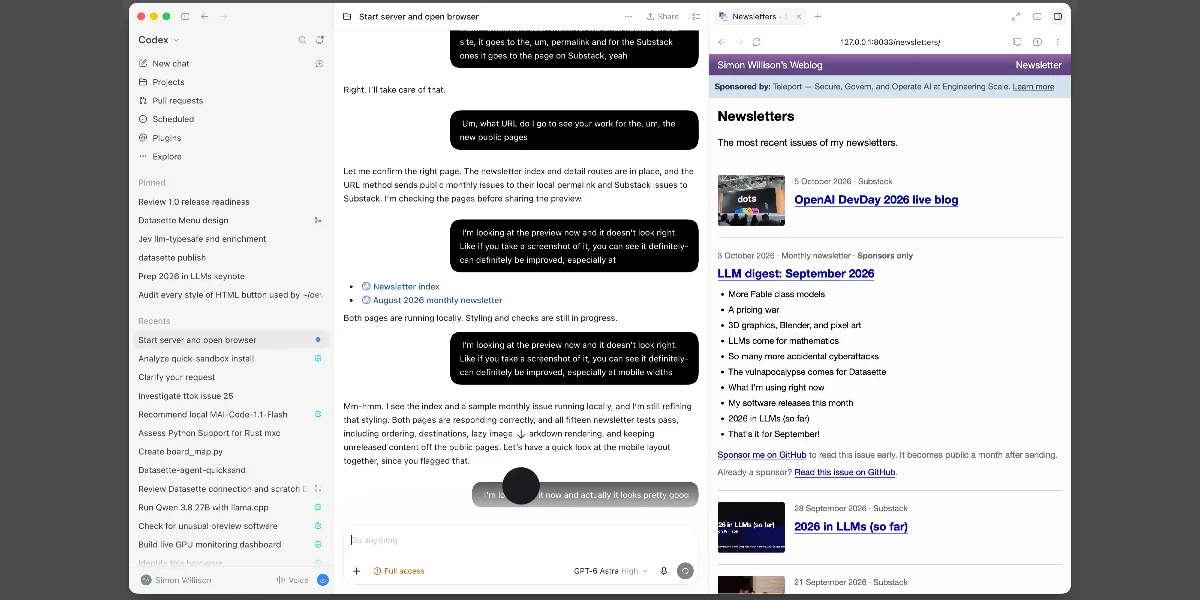
Why does it matter to an everyday developer?
This feature enables hands-free, multitasking coding workflows, such as coding while cooking or otherwise occupied. It also makes it possible to discuss feature designs, request code changes, and preview results in real time. Developers can use the voice mode to accelerate prototyping and offload routine code generation tasks while keeping their focus on higher-level feedback. However, for detailed debugging or when precise control (such as copy-pasting logs or using private credentials) is required, switching to typed interaction remains necessary.
What can the developer do now?
Developers with access to the ChatGPT desktop app can use the Codex tab's voice conversation mode for local projects. To start, spin up a development environment, launch a new voice chat, and describe the feature or update you wish to implement. Provide iterative spoken feedback, inspect live previews, and when the workflow requires, switch to typing for detailed edits or sensitive operations. This approach works best for high-level code changes, iterative mockup adjustments, and prototyping where conversational feedback can drive AI-powered automation.